Keep your message conversations
as clean, dated records
Message Exporter saves a conversation as PDF, HTML, CSV, Excel, or plain text, every message with its date and time, and collects every photo, video, PDF and file shared in it. Built for businesses, legal and professional teams who work with clients over messages. Nothing is uploaded. Nothing leaves your computer unless you export it.


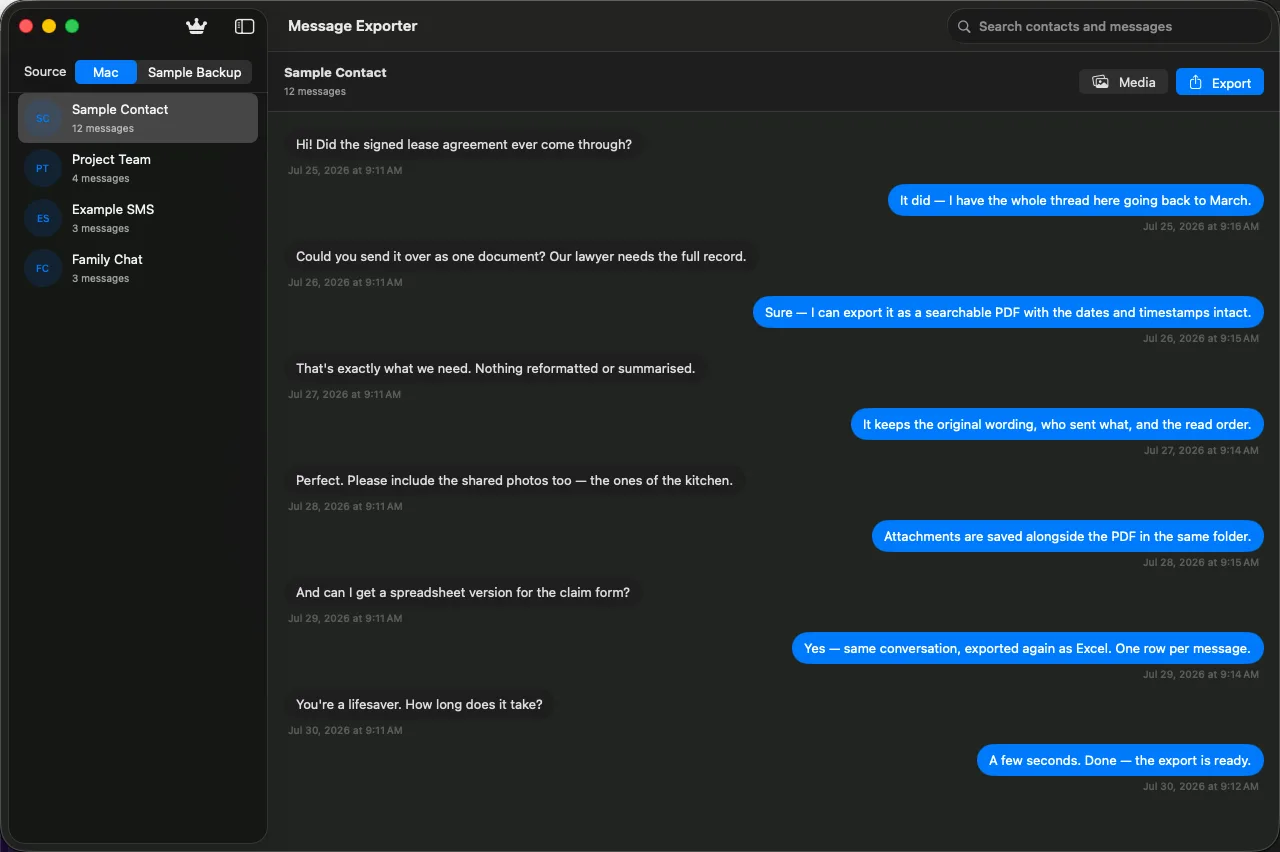
The actual app. Contacts on the left, the conversation on the right.
Who it's for
For teams that work with clients over messages
When a client conversation happens in messages, the history lives on a phone or a computer, not in your files. Message Exporter turns it into a dated record you can keep with the rest of the client file: the text, every photo, video, PDF and document shared, and a timestamp on each message.
Businesses of every kind
Agree a price, a date or a change with a customer over a message? Keep the whole conversation, with timestamps, in the customer's file.
Legal teams
Export a client conversation to a dated PDF, with the documents and photos exchanged, ready to file alongside the matter.
Accountants and bookkeepers
Excel and CSV exports put dates, direction and message text in rows, so a client's messages can sit next to the books.
Consultants, agencies and freelancers
Keep a record of scope, approvals and files sent back and forth with each client, one export per contact.
Message Exporter makes files from your own messages. It is not legal advice, and it does not certify a record for any court, regulator or auditor; ask your adviser what your own rules require.
How it works
Three steps, about a minute
There is no import, no sync, and no account required to start. Message Exporter reads the Messages database that already exists on your Mac.
Grant Messages access
On first launch the app asks you to choose your Messages folder in a normal macOS open panel. One click, no Full Disk Access, revocable any time.
Pick a conversation
Browse or search your contacts and group chats, then read the thread in the app to be sure it's the right one before you export.
Choose range and format
Set the time range, pick a format, decide whether to include attachments, and save the file wherever you want it.
Features
Built for keeping records, not screenshots
Message threads are client history, agreements, receipts, project files, and family memory. They deserve to exist as something better than a phone photo of a screen.
Every conversation, in one list
Your Mac Messages contacts and group chats, with message counts, sorted and searchable. Pick a thread and read it before you export anything.
Search names and message text
One search field looks through contact names and the words inside messages, so you can find the thread you half-remember.
Export exactly the range you need
Last 7 days, last 30 days, all time, or a custom window. The export sheet tells you how many messages are in the range before you commit.
Five real file formats
PDF for reading and filing, HTML for sharing, CSV and Excel for analysis, plain text for anything else. Not screenshots — actual documents.
Shared media, collected for you
Manage Media finds every photo, video, PDF and file shared in a thread. Select what you want, or export the whole set as a ZIP.
Reads local iPhone backups
Point it at an encrypted iPhone backup already on your Mac and browse those conversations too — useful for messages your Mac never synced.
A timestamp on every message
PDF, HTML, plain text, CSV and Excel exports carry the date and time of each message and who sent it, so the record shows what was said and when.
Made for client conversations
Pick the contact, set the date range, export the thread with every shared file, and keep it in the client's folder.
Ready for files and spreadsheets
File or print the PDF. Open the Excel or CSV export next to the books. Send the HTML to a colleague who needs to read it as a chat.
A closer look
Every screen below is the real app
No mockups, no illustrations of features that don't exist — these are captures of Message Exporter running on macOS.
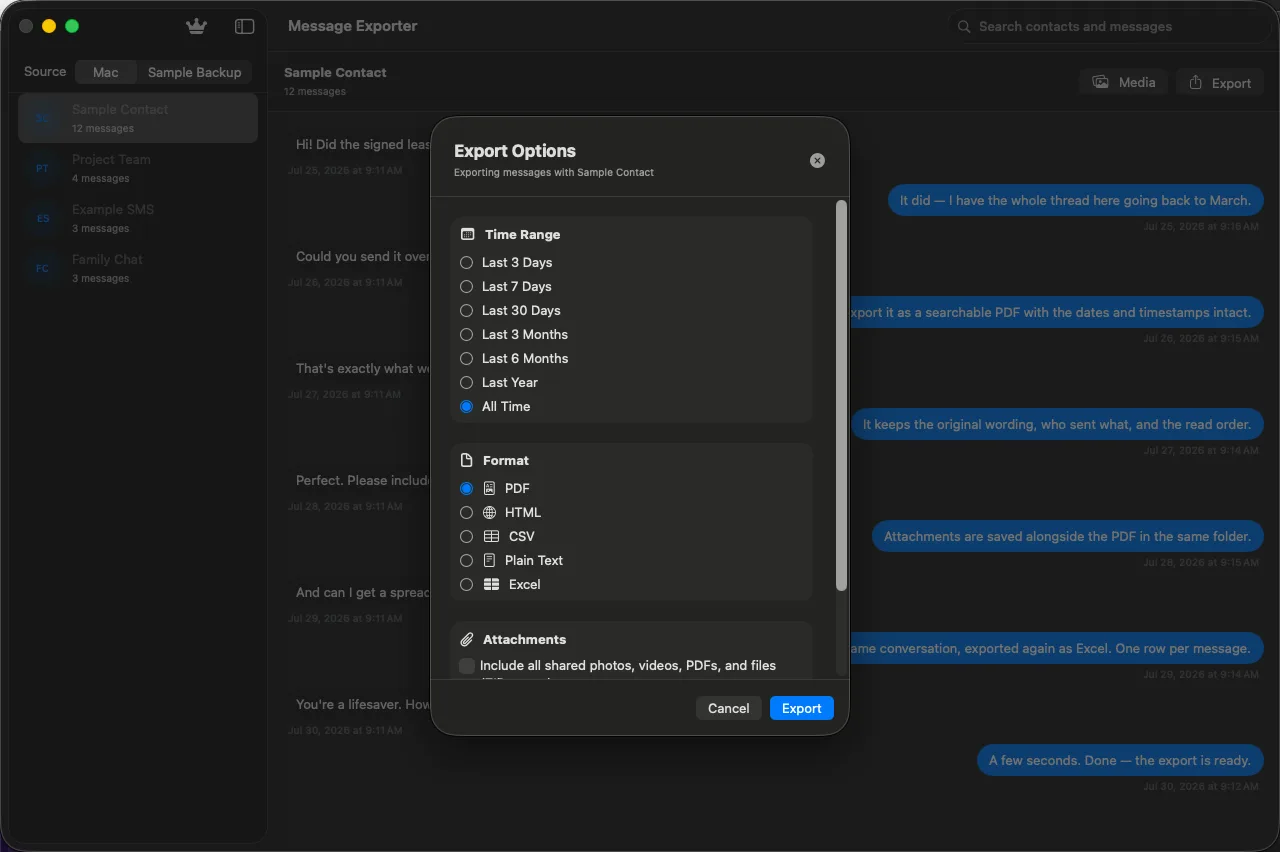
The export sheet
One sheet holds every decision: time range, file format, and whether to bring the attachments along. It shows the message count for the range you picked, so you know what you're about to save.
- Time range — 3 days, 7, 30, all time, or custom
- Format — PDF, HTML, CSV, Excel, or plain text
- Attachments — all files in range, or a selection you choose
- A live count of the messages included
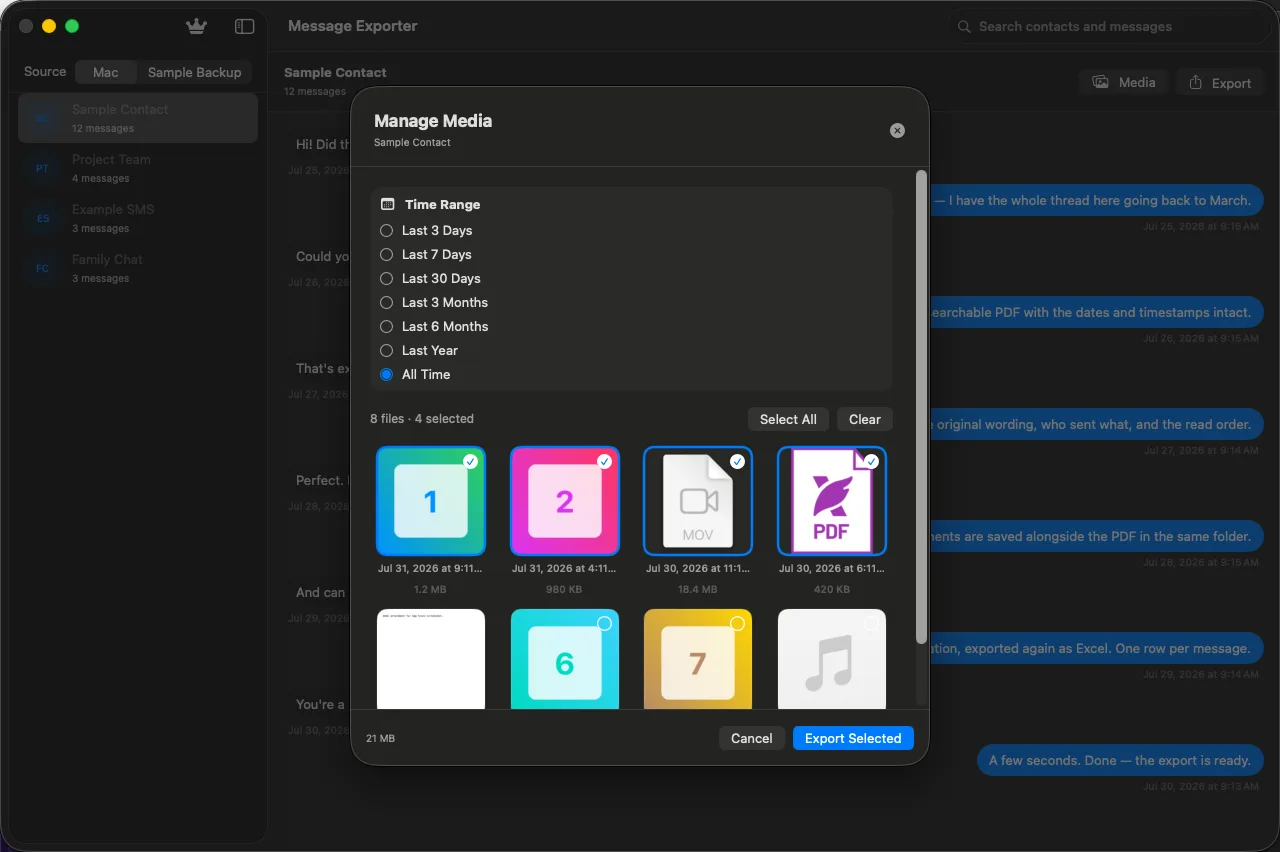
Manage Media
Photos, videos, PDFs, voice memos and documents shared in a conversation are scattered across your disk with meaningless filenames. Manage Media lists them all with real names, sizes and dates — select all, clear, or hand-pick, then export the set as a ZIP.
- Every attachment in the thread, in one grid
- Filter by the same time ranges as the export
- Select all, clear, or choose individual files
- Free plan includes media from the last 3 days
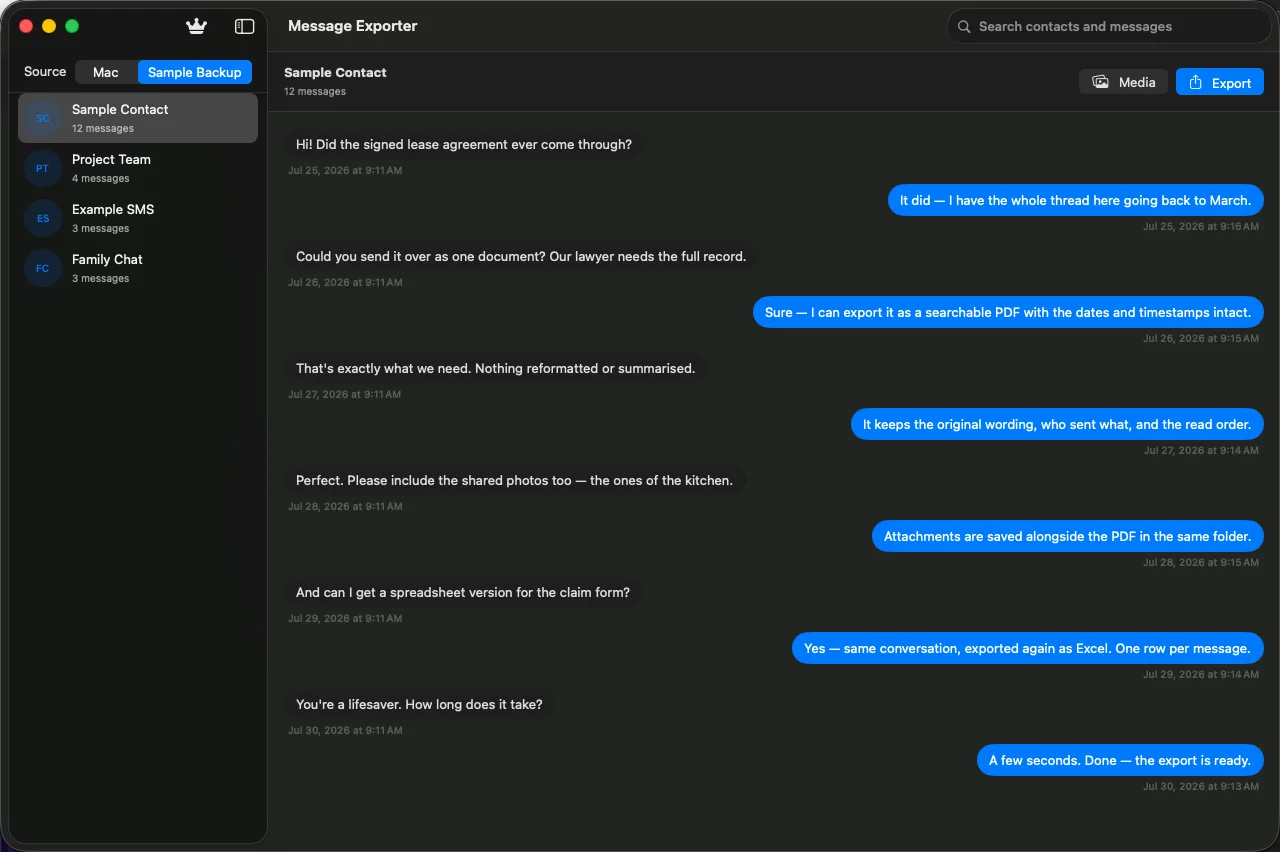
Local iPhone backups
If you keep an encrypted iPhone backup on this Mac, Message Exporter can read the conversations inside it. Switch the source with a toggle in the toolbar and browse them exactly like your Mac messages.
- Add a backup folder from the sidebar
- Switch between Mac and iPhone with the Source picker
- Encrypted backups are decrypted locally, on your Mac
- Same search, preview and export tools apply
Access on your terms
Message Exporter is sandboxed. It cannot read your Messages folder until you point it there yourself, and it asks in the standard macOS open panel rather than sending you to a settings pane to hand over your whole disk.
- No Full Disk Access requirement
- Contacts access is optional — decline and you'll see numbers
- Revoke access whenever you like
- Distributed and notarised through the Mac App Store
Open the app
Message Exporter starts with no access to anything. It explains what it needs before it asks.
Point it at your Messages folder
The standard macOS open panel appears at ~/Library/Messages. Click Allow and that one folder becomes readable — nothing else on your disk does.
Export whenever you like
macOS remembers the choice, so you only do this once. Revoke it any time by resetting the app's permissions or moving it to the Trash.
Full Disk Access is never requested. Other Messages tools ask you to hand over your entire drive in System Settings. This one does not.
Formats
Save it as the thing you actually need
Different jobs need different files. A transcript you'll hand to a lawyer isn't the same artefact as one you'll pivot in a spreadsheet.
Privacy
Your messages never reach us
There is no upload step in Message Exporter, because there is nowhere to upload to. The app reads your local Messages database and writes files to the folder you choose.
Local reads, local writes
Messages, attachments and iPhone backups are read from your disk and exported to your disk. No copy is sent anywhere.
No analytics, no ads
There is no third-party analytics SDK, no advertising, and no tracking identifier in the app.
Sign-in is only for Pro
An account exists so your subscription follows you to another Mac. It holds an email address and a plan status — nothing about your messages.
Full detail in the Privacy Policy.
Pricing
Try it on your own messages first
The free plan isn't a demo with fake data — it exports your real conversations, limited to the last three days. If it does what you need, Pro removes the limits.
Free
- Browse and search every conversation
- Read full threads in the app
- Export the last 3 days as plain text
- Shared photos, videos, PDFs and files from the last 3 days
- Add and browse local iPhone backups
Pro
- Everything in Free
- Any time range — 7 days, 30 days, all time, custom
- PDF, HTML, CSV, and Excel export
- Full attachment export as a ZIP, any range
- Your subscription follows your account to another Mac
Billed through your Apple Account and renews monthly until cancelled. Cancel any time in System Settings → Apple Account → Subscriptions. Prices shown in USD; your local price appears in the App Store before you buy.
Questions
The things people ask first
More in the user manual and on the support page.
Can I use it to keep records of client conversations?
Yes. Pick the contact, choose the date range, and export the conversation with the photos, videos, PDFs and files shared in it. Each message carries its date and time. It is a tool for making your own files; it is not legal advice and does not certify a record for any court or regulator.
Does the export include dates and times?
Yes. Every format (PDF, HTML, CSV, Excel and plain text) carries the date and time of each message; CSV and Excel also mark each row as sent or received.
Does it upload my messages anywhere?
No. Reading, previewing, and exporting all happen on your Mac. Message text and attachments are never sent to us. See the Privacy Policy.
Do I need Full Disk Access?
No. Message Exporter is sandboxed and asks you to pick your Messages folder once, through the standard macOS open panel. You can revoke it any time.
What does the free version do?
The last 3 days of any conversation, exported as plain text, plus the photos, videos, PDFs and files shared in those 3 days. Enough to see exactly how it works on your own messages before paying.
Can I export a group chat?
Yes. Group conversations appear in the contacts list like any other thread, and export with sender names included.
Will the export include attachments?
With Pro, yes — attachments are copied out alongside the transcript and bundled in a ZIP. You can also hand-pick which files to include.
How do I cancel?
System Settings → Apple Account → Subscriptions, like any App Store subscription. You keep Pro until the end of the period you paid for.
Keep the conversations that matter
Try it on your own threads first, and everything stays on your computer.